Forex Screening API: How to Screen the FX Market with XQL and Python
XCREENER's guides on market screening and forex screening walk through the five screeners in the browser, clicking through gainers, breakouts, RSI and the rest. This guide covers the same job from code.
Same continuously updated data, same markets. The difference is that instead of clicking a panel and reading a table, you write a short query, send it to the API, and get the matches back as plain Python objects you can loop over, save, or drop into a DataFrame.
Three pieces do the work: XQL (XCREENER's Query Language), the XQL HTTP API, and the official Python SDK. By the end you'll be able to write a forex screen, check it for free, run it, and read the results. We won't cover trading setups or what to do with the matches. This is purely about how the querying works.
One thing worth saying up front: XCREENER is read only. It scans the market and hands back the pairs that match. It doesn't place orders and it doesn't connect to a broker.
What you'll need
- An XCREENER account and an API key. Generate one at xcreener.com/account/api-key. The raw key is shown once, and generating a new one invalidates the old one everywhere it's in use, so store it somewhere safe.
- Python and the SDK:
pip install xcreener. If you want results as a DataFrame later, installpip install 'xcreener[pandas]'instead. - A rough sense of the quota. The free tier includes a small number of run calls per day (check the pricing page for the current number). Checking and inspecting queries doesn't count against it, which we'll come back to at the end.
Step 1: Learn the shape of an XQL query
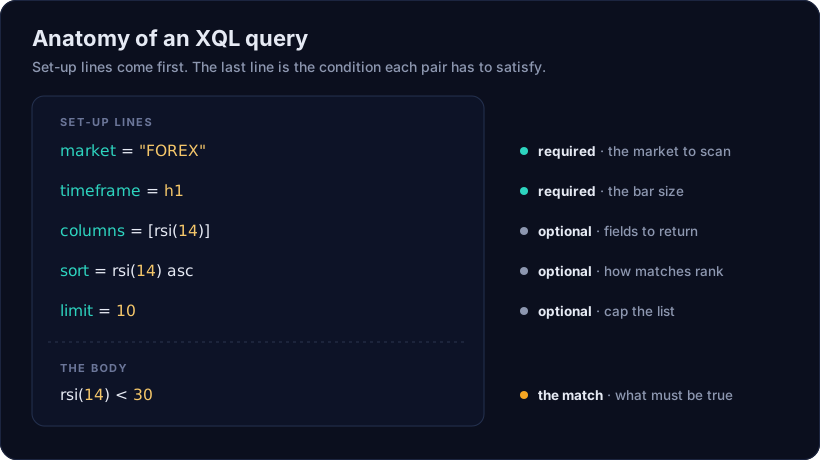
An XQL query is a few set-up lines followed by one mandatory boolean expression. The set-up lines configure the scan and what comes back; the last line always has to evaluate to true or false for every pair — but, as this first example shows, it doesn't have to filter anything out.
List every FX pair with RSI, oversold, and overbought flags
market = "FOREX"
timeframe = h1

let rsiVal = rsi(14)
let oversold = rsiVal < 30
let overbought = rsiVal > 70

columns = [rsiVal, oversold, overbought]
sort = rsiVal asc

rsiVal >= 0
Two set-up lines are required. market is one of "CRYPTO", "FOREX", "INDICES", "COMMODITIES", or "METALS", in quotes and uppercase. For a forex screen it's always "FOREX". timeframe is the bar size, written as a bare word: m15, m30, h1, h2, h4, d, or w.
The other three set-up lines are optional and only shape the output:
columnslists the extra values you want back for each match. Leave it out and you only get the symbol.sortranks the matches. The direction (ascordesc) is required.limitcaps the list to the top N.
Above columns, two let lines name intermediate expressions: rsiVal for the indicator itself, then oversold and overbought as booleans built from it. Both get listed in columns alongside rsiVal, so every pair comes back with its RSI and both flags.
The final line is still mandatory, but here it's rsiVal >= 0, which is always true since RSI is bounded between 0 and 100 — so every pair in the market matches. The real work already happened above it: XQL has no string type and no if/case construct, so a single text label like "oversold" can't be produced inside the query itself. Two booleans is as close as the language gets; we'll fold them into one label in Python at the end of this guide.
Step 2: Set up the client
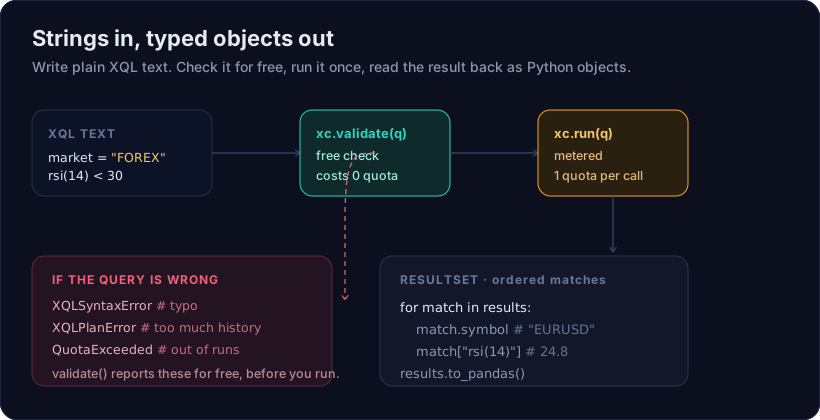
The SDK's whole design is "strings in, typed objects out." You hand it XQL text, it hands back Python objects.
from xcreener import Xcreener

xc = Xcreener()  # reads the XCREENER_API_KEY environment variable
With no arguments, the client reads your key from the XCREENER_API_KEY environment variable. You can also pass it directly, which wins over the environment:
xc = Xcreener(api_key="your-key-here")
The client is also a context manager, so with Xcreener() as xc: cleans up the connection for you when the block ends. Most of the SDK's own examples use that form.
Step 3: Check, inspect, then run
There are four calls on the client. Three of them are free, and only one spends your quota, so the natural order is to check a query for free first and run it once you're happy.
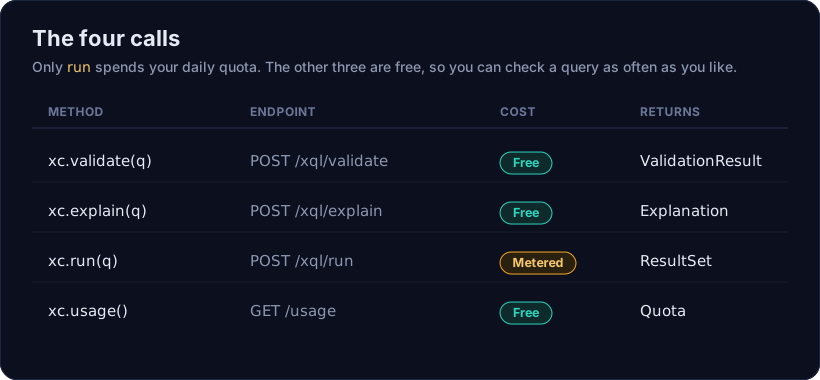
Validate first. validate parses and plans the query without touching live data or your quota. Checking a query is the entire point of the call, so a bad query comes back as a normal result you can read, not an exception you have to catch.
query = """
market = "FOREX"
timeframe = h1

let rsiVal = rsi(14)
let oversold = rsiVal < 30
let overbought = rsiVal > 70

columns = [rsiVal, oversold, overbought]
sort = rsiVal asc
limit = 10

rsiVal >= 0
"""

result = xc.validate(query)
if result:
    print("looks good")
else:
    print(result.message)
A ValidationResult is truthy when the query is valid, which is why if result: reads correctly. When it isn't, result.message holds the raw error text from the API.
Explain to see what it will do. explain is also free. It returns the query's plan (what data the server has to fetch) plus a plain description of the screen, which is a good sanity check that the query means what you think.
plan = xc.explain(query)
print(plan.explanation)
# Scans FOREX on h1. Matches when rsiVal >= 0. Columns: rsiVal, oversold, overbought.
# Sorted by rsiVal asc. Limited to 10 results.
Run to get the matches. run is the one metered call. It executes the query against live data and returns the pairs that match right now.
results = xc.run(query)
print(results.symbols)
# ['EURUSD', 'GBPUSD', 'USDJPY', ...]
Since the body never filters anything out, this always returns pairs — up to the limit = 10 in the query — rather than an empty set. That's expected for a query that lists and labels instead of screening; nothing here is being excluded.
Step 4: Read the results back
run returns a ResultSet, which is an ordered list of Match objects. The order is meaningful: it follows your own sort and limit. You can loop over it directly.
results = xc.run(query)

for match in results:
    print(match.symbol, match["rsiVal"], match["oversold"], match["overbought"])
Two details matter here.
First, match.symbol is the pair, and match["rsiVal"] reads a column value. The key is exactly the text you wrote in columns — since these columns are let names rather than a bare rsi(14) call, the keys come back clean: rsiVal, oversold, overbought.
Second, and this trips people up once: only the fields in columns come back. Declaring a let doesn't add a column by itself. So even though the body mentions rsiVal, you still had to list rsiVal, oversold, and overbought in columns to read them off each match. If you forget one, match["overbought"] raises a KeyError, and the message tells you exactly that: add the expression to columns.
A ResultSet also gives you a few conveniences beyond looping:
results.symbols              # ['EURUSD', 'GBPUSD', 'USDJPY', ...]
results.column("rsiVal")     # [22.4, 47.9, 71.3, ...]
results.column("oversold")   # [True, False, False, ...]
results.to_dicts()           # list of {symbol, ...columns} dicts
results.to_pandas()          # DataFrame indexed by symbol (needs the pandas extra)
Step 5: Shape the output
The columns, sort, and limit set-up lines are how you turn a raw scan into a tidy table. Say you want every pair's RSI and flags, ranked so the pairs closest to oversold come first, capped at ten rows:
RSI + oversold/overbought flags, ten most oversold first
market = "FOREX"
timeframe = h1

let rsiVal = rsi(14)
let oversold = rsiVal < 30
let overbought = rsiVal > 70

columns = [rsiVal, oversold, overbought]
sort = rsiVal asc
limit = 10

rsiVal >= 0
sort = rsiVal asc puts the lowest RSI first, so the pairs closest to (or already inside) oversold territory lead the list, and limit = 10 caps it at ten rows. One rule to remember: whatever you sort by has to be something the query already touches, either in columns or in the body — rsiVal qualifies on both counts here. Don't introduce a brand new series or timeframe in sort alone, or it won't have the data to rank on.
You can put more than a bare indicator in columns. Function calls, arithmetic, and let-bound names are all fine, and each one becomes a column keyed by the text you wrote.
Step 6: Narrow to specific pairs
By default a forex query scans every pair in the FOREX market. If you only care about a handful, add a symbols set-up line. It's a pre-filter, not part of the match condition, so it just limits which pairs get scanned before anything else runs.
RSI + oversold/overbought flags, limited to specific pairs
market = "FOREX"
timeframe = h4
symbols = ["EURUSD", "GBPUSD", "USDJPY"]

let rsiVal = rsi(14)
let oversold = rsiVal < 30
let overbought = rsiVal > 70

columns = [rsiVal, oversold, overbought, close]

rsiVal >= 0
This computes the same RSI and flags, but only for those three pairs. Two things to know: leave the pragma out entirely to scan everything (an empty list, symbols = [], is a parse error), and symbol names aren't checked against a list, so a misspelled pair simply matches no data rather than raising.
Step 7: Handle the things that go wrong
Errors fall into two groups, and the SDK treats them differently on purpose.
validate reports problems as a result, because checking is what it's for. run and explain raise on the same bad query, because at that point it really is a bug in your code. Here are the two you'll meet most.
A syntax error is a typo in the query itself. Offsets, for example, need a literal minus sign. Writing rsi(14)[1] for "one bar ago" is wrong; it's rsi(14)[-1]. Validate it and you get the raw message back:
Expected '-' (offset indexing uses the form [-N], e.g. [-1]) but found '1' (line 3, column 9)
Run the same query and you get an XQLSyntaxError instead, whose printed form points a caret at the offending column.
A plan error means the query is well formed but asks for more history than the engine will fetch. There's a hard ceiling of 300 bars per timeframe. Ask for a 365-day high on the daily and it's rejected:
Query requires 366 bars of history for d, exceeding the maximum of 300
The fix is usually a coarser timeframe. A "52-week high" is the same idea in far fewer bars, so w::highest(high, 52) plans fine where the daily version doesn't. (The w:: prefix means "measured on weekly bars," which you can attach to any expression regardless of the query's own timeframe.)
The full set of exceptions is small and specific:
XcreenerError
├── AuthenticationError   key missing or unrecognized
├── QuotaExceeded         out of runs for the day, has a .reset_at
├── XQLError              the query was rejected
│   ├── XQLSyntaxError    a typo, with .line and .column
│   └── XQLPlanError      too much history, with .required_bars and .max_bars
├── UpstreamError         a server-side outage (already retried)
└── TransportError        the request never reached the API
Plan errors parse themselves, so you don't have to match on message text:
from xcreener import Xcreener, XQLPlanError

with Xcreener() as xc:
    try:
        xc.run(query)
    except XQLPlanError as exc:
        if exc.is_lookback_ceiling:
            print(exc.required_bars, exc.max_bars, exc.timeframe)
Step 8: Stay inside your quota
Only run counts against your daily limit. validate, explain, and usage are all free. That's what makes the check-first workflow cheap: you can iterate on a query as many times as you want and only spend a run once it does what you mean.
If you'd rather not remember to validate by hand, run can do it for you:
xc.run(query, precheck=True) # free validate first; a bad query costs 0 quota
Set Xcreener(precheck=True) to make that the default while you're developing. Once a query is fixed in your source and has checked out once, you can drop the precheck and go straight to run, since valid XQL doesn't drift.
To see where you stand, usage returns your current quota and still answers even after you've hit the limit:
quota = xc.usage()
print(f"{quota.remaining}/{quota.limit} runs left today")
And because every run response carries the count in its headers, you can read it off the last call without spending another request:
if xc.rate_limit:
    print(xc.rate_limit.remaining, "runs left")
Put it together: a runnable script
Here's everything above as one script: validate, explain, run, read the results, and — since XQL itself can only hand back the two booleans — fold oversold/overbought into a single label in Python. Copy it, set XCREENER_API_KEY, and run it as-is:
from xcreener import Xcreener, XQLPlanError

QUERY = """
market = "FOREX"
timeframe = h1

let rsiVal = rsi(14)
let oversold = rsiVal < 30
let overbought = rsiVal > 70

columns = [rsiVal, oversold, overbought]
sort = rsiVal asc
limit = 10

rsiVal >= 0
"""

def label(match) -> str:
    if match["oversold"]:
        return "oversold"
    if match["overbought"]:
        return "overbought"
    return "neutral"

def main() -> None:
    with Xcreener() as xc:  # reads XCREENER_API_KEY from the environment
        result = xc.validate(QUERY)
        if not result:
            raise SystemExit(f"invalid query: {result.message}")

        plan = xc.explain(QUERY)
        print(plan.explanation, "\n")

        try:
            results = xc.run(QUERY, precheck=True)
        except XQLPlanError as exc:
            raise SystemExit(
                f"query needs {exc.required_bars} bars, max is {exc.max_bars}"
            )

        for match in results:
            print(f"{match.symbol:8s} rsi={match['rsiVal']:5.1f}  {label(match)}")

        quota = xc.usage()
        print(f"\n{quota.remaining}/{quota.limit} runs left today")

if __name__ == "__main__":
    main()
This is the pattern worth keeping: compute what XQL can actually express — oversold and overbought as booleans — and finish the last step, collapsing them into one label, in Python.
Where to go next
That's the whole loop: write XQL, validate it for free, explain it to be sure, run it once, and read the matches back. The same query language and the same three endpoints cover the other markets too, so swapping "FOREX" for "METALS" or "CRYPTO" reuses everything here.
- The forex screening guide covers the same screens in the browser, if you'd rather point and click.
- The market screening guide is the wider overview of how screening works across every market.
- The Python SDK, with runnable examples for errors, quota, and DataFrame output, lives at github.com/xcreener/xcreener-sdk-python.
If you'd rather drive XCREENER from an assistant than from a script, the same API also backs an open-source MCP server, so a query you prototype here carries straight over.